Recent security vulnerabilities have been hitting one after another. Between October 20 and 21, security researchers publicly disclosed a critical remote code execution (RCE) vulnerability chain in PHP. Then on October 28, tech communities and Reddit were flooded with help threads: numerous Synology NAS users reported their storage being completely filled up, files appended with .LOCK3D or .L0CK3D extensions, and a ransom note named read-me3.txt dropped into their directories.
The moment I saw the PHP vulnerability disclosure, my mind immediately went to my blog’s image host — a PHP-based Chevereto instance — and I stopped the service on my Synology NAS right away. When the Synology ransomware wave broke out shortly after, I had no choice but to cut off public network access to the NAS entirely and tighten my security policies. The combination of these two events meant my original image hosting service wouldn’t be coming back anytime soon, prompting me to migrate to a new solution.
The Previous Setup: Chevereto
Previously, my blog used Chevereto for image hosting. Chevereto started out as a free, open-source self-hosted image hosting solution. After major rewrites in V2 and V3, it transitioned to a one-time purchase commercial license, while the official team spun off a separate free open-source edition called Chevereto-Free with certain paid features stripped out. With the final release of V3, the team announced the end of maintenance for the free branch and shifted their commercial licensing from a one-time purchase to a subscription model — a move that sparked heated debate in the community.
Following that shift in business strategy, V4 was released, unifying the codebase for both the free and paid tiers. Over time, the official release added multi-tenant support and continued patching vulnerabilities that also affected older versions. Even today, Chevereto remains an exceptionally feature-complete image hosting solution with a mature community and media showcase interface.
Why Cloudflare R2?
As mentioned above, Chevereto had a free open-source branch, and the instance I deployed was a multi-language fork based on it: chevereto-free-multi-language. Now that I’ve migrated to Cloudflare R2, several key factors drove that decision.
Technical Robustness and Stability
At its core, the decision to migrate wasn’t just about the risk of Synology ransomware — it was also the fact that Chevereto is built on PHP, where vulnerabilities tend to have a wide blast radius and high severity. For an individual maintainer, discovering, tracking, and patching vulnerabilities the moment they emerge is practically impossible. Those steps are not only time-consuming and labor-intensive, but often depend on upstream fixes as well — especially over the past couple of years, as the rapid advancement of AI has dramatically accelerated both vulnerability discovery and exploitation.
Compared with a traditional PHP stack, R2 presents a much narrower attack surface for media storage. It is passive static storage with no execution environment, making it inherently immune to server-side code execution. Moreover, R2 is driven purely by an S3-compatible API, decoupling storage from infrastructure operations and eliminating the burden of maintaining a host operating system.
Scope of Service and Usage
During the selection process, I also looked into the open-source project CloudFlare-ImgBed, a multi-channel aggregated image management tool that supports both Docker and serverless deployments. However, based on my past usage, all I really need is a dedicated image host for my blog — major social platforms and forums already provide their own built-in image hosting, so I have no other use cases.
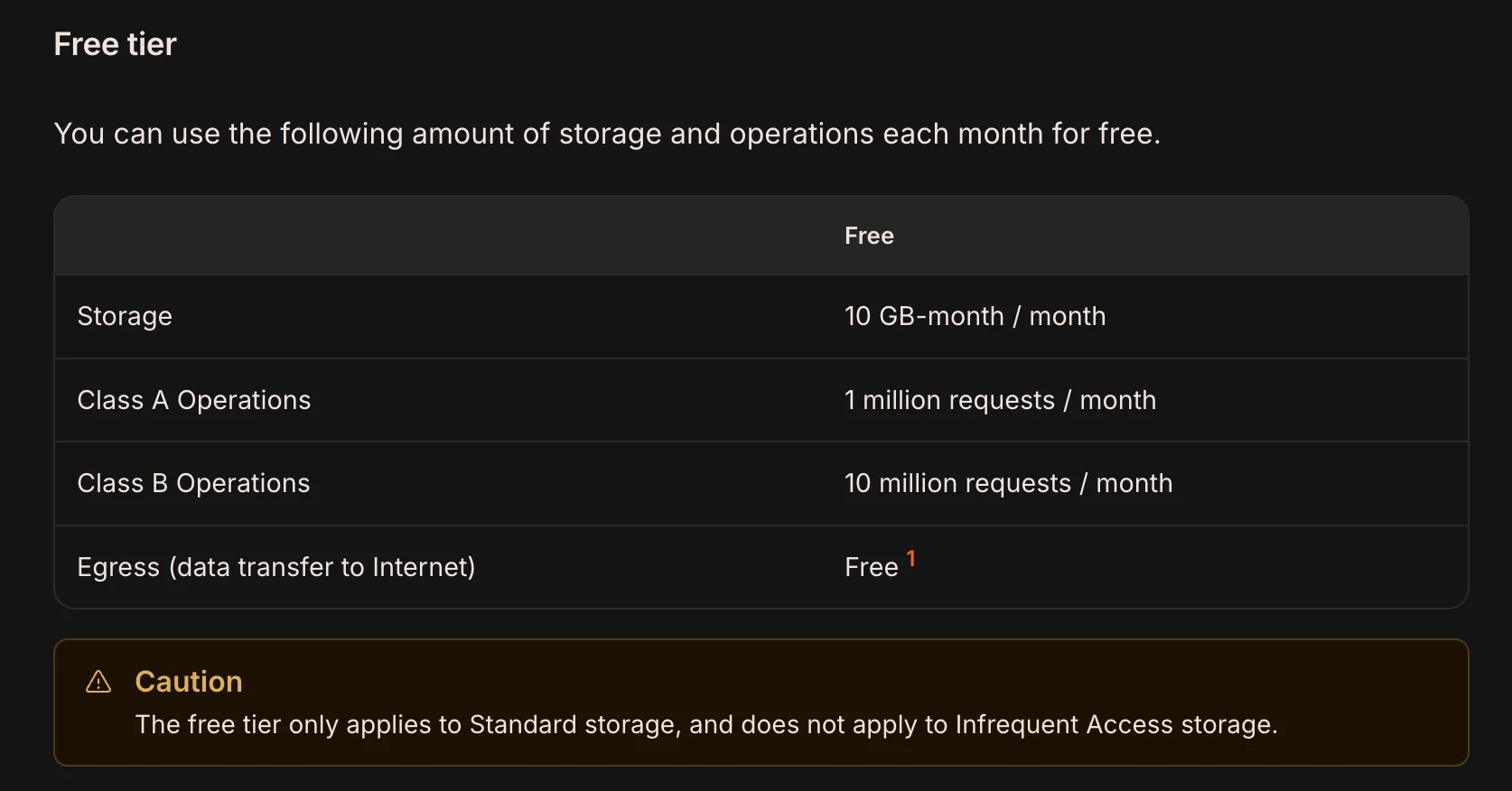
Furthermore, my blog currently has fewer than 100 images in total, and I publish new posts infrequently. My usage pattern is low-frequency overall with short bursts of activity concentrated while drafting a new post. Cloudflare R2’s free tier offers 10 GB of storage per month, 1 million Class A operations per month, 10 million Class B operations per month, and completely free egress bandwidth — which is more than enough for personal use.
Network and Availability
Cloudflare is practically a household name in the tech world, and thanks to its generous free tier, netizens in the Chinese community affectionately call it the “Great Philanthropist.” Backed by Cloudflare’s global CDN network, R2 delivers solid access speeds around the world.
Although access speeds to Cloudflare services from mainland China are relatively slow, my blog itself is hosted on Cloudflare Pages without an ICP filing or SEO targeting mainland Chinese search engines. As a result, readers who reach my blog generally already have good global network connectivity, which effectively sidesteps the drawback of direct mainland connection speeds.
Enhancing the Workflow with PicList
For migrating existing images, since the new setup uses an MD5 naming rule to distinguish files uploaded on the same day, I uploaded all old images to R2 in bulk and leveraged AI visual comparison to replace the legacy image links across my past posts.
Simply moving existing images from the NAS to R2 isn’t enough, though — inserting images while writing has to be as frictionless as possible. Ideally, after taking a screenshot, I should be able to upload it with a single shortcut and paste the formatted link straight into my draft; otherwise, it really kills the momentum of writing. When using Chevereto, I paired it with PicGo, a minimalist image uploader with 7 built-in services that can be extended via third-party plugins to support protocols like WebDAV.
After migrating to R2, I switched to PicList, a fork built on top of PicGo. Compared with PicGo, PicList natively supports over 20 image hosting services — including Cloudflare R2 right out of the box. It features native S3 protocol support and a full-fledged built-in file manager for two-way cloud data management. On top of that, PicList comes with built-in image processing tools capable of compressing images, converting formats, and stripping EXIF metadata before upload. Once configured, adding an image while writing is as simple as taking a screenshot, hitting a keyboard shortcut to upload, and pasting.
Is Self-Hosting Still a Good Choice?
The rise of AI is undoubtedly a double-edged sword. In the past, when you wanted a feature that didn’t exist, you had to go through a long cycle of learning, building, and debugging. Today, you can simply tell an AI what you want and have it built for you, which has sparked an explosion of self-hosted services. Yet without a solid foundation in software engineering, networking, and security, the quality of AI-generated projects remains questionable.
At the same time, as AI-assisted vulnerability discovery is increasingly weaponized by malicious actors, services that were already riddled with flaws are now in an even worse position. Exposed to the public internet, a compromise can range from service downtime at best to leaked personal data or even financial loss at worst.
On top of that, as more and more vulnerabilities are uncovered and exploited, the maintenance cost of self-hosted services keeps climbing — making me wonder whether self-hosting will still be a good choice going forward. Compared with an individual, major cloud providers with far greater resources and more mature security systems generally offer much stronger guarantees in both response speed and protection. Sometimes, choosing a mature third-party service may simply be a better path than self-hosting. As for where things go from here, we will have to wait and see how fast — and how far — AI continues to evolve.
References
- Pricing · Cloudflare R2 docs
Pricing information for Cloudflare R2
Comments